Tuesday, April 1, 2014

Scientists Have Been Doing TDD for Centuries

I've recently been watching Cosmos: A Spacetime Odyssey (and I don't have the words to describe how excellent it is), and the subject came up with my children about what science really is. Fundamentally, aside from all the various beliefs and opinions that people have, how can one truly know what is "science" and what is not.

The answer turns out to be very simple. The science is in the test. Ideas, opinions, even reason and logic themselves are all ancillary concepts to the test. If it isn't tested (or for whatever reason can't be tested, such as supernatural beliefs), then it isn't science. That isn't to say that it's wrong or bad, simply that it isn't science.
Science is the act of validating something with a test.
You can believe whatever you like. You can even apply vast amounts of reason and logic and irrefutably derive a very sensible conclusion about something. But if you don't validate it with a test, it's not science. It's conjecture, speculation. And as I like to say at work, "Speculation is free, and worth every penny."

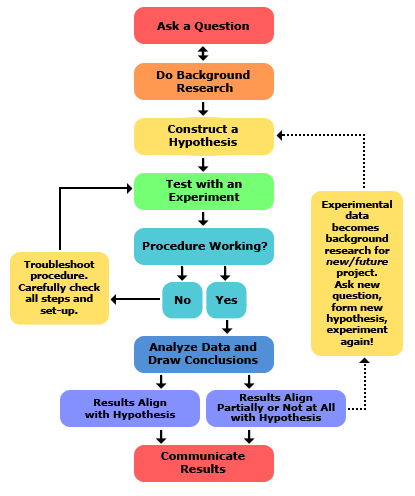
A Google search on "the scientific method" (which I think we can agree is the core foundation of all scientific study) lands me on a site called Science Buddies, which presents this handy graphic to visualize the process:
This seems similar enough to what I remember from grammar school. Notice a few key points:
  • Attention is drawn to the bright green box. (Green means good, right?) That box is the center of the whole process. That box is the test being conducted.
  • The very first step is "Ask a Question." Not define what you think the answer is, not speculate on possible outcomes, but simply ask the question.
  • There's a cycle to the process, using the tests to validate each iteration of the cycle. The results of the tests are fed back into the process to make further progress.
This reminds me of another cycle of testing:
Even the coloring is the same. The first step, in red, is to ask the question. The central step, in green, is to run a test against the implementation to produce results, validating both the test and the implementation. The loop back step, in blue, is to adjust the system based on the results of the test and return to the start of the cycle, using the test and its results to further refine and grow the next test(s).
TDD is the Scientific Method applied to software development.
The two processes share core fundamental values. Values such as:

  • Begin by asking a question. The purpose of the process is not to answer the question, but to arrive at a means of validating an answer. Answers can change over time, the key value is in being able to validate those answers.
  • Tests must be repeatable. Other team members, other teams, automated systems, etc. must be able to set up and execute the test and observe the results. If the results are inconsistent then the tests themselves are not valid and must be refined, removing variables and dependencies to focus entirely on the subject being tested.
  • The process is iterative and cyclic. Value is attained not immediately, but increasingly over time. Validating something once is only the first step in the process, if the same thing can't be validated repeatedly then it wasn't valid in the first place, the initial result was a false positive. Only through repetition and analysis can one truly be confident in the result.
We've all heard the analogy that TDD is similar to double-entry bookkeeping. And that analogy still holds true. This one is just resonating with me a lot more at the moment. It's not just the notion that the code and the tests mutually confirm each other, but that the fundamental notion of being able to validate something with a repeatable test is critical to truly understanding that something. Anything else is just speculation.

Monday, March 24, 2014

Don't Judge Too Quickly

Writing software is a team effort. And as with any team effort, we have to work together. This includes the ever-dreaded notion of having to read, understand, and perhaps even maintain code written by somebody else. Maybe that "somebody else" is a close and trusted colleague, maybe it is a client-appointed counterpart, maybe it is a team member who left the team long ago. Regardless of who originated the code we're looking at, that developer is in some way a part of the overall team.

And let's be honest here... We don't like working on other people's code. It's not something to be ashamed of. After all software development is in many ways a creative endeavor, an ill-defined Venn intersection between creativity, engineering, salesmanship, sarcasm, and caffeine. And who wants to create on top of something that's already been created? A painter prefers a canvas to be blank. A sculptor prefers an unbroken stone. But these analogies extend only so far in our craft, and clinging too tightly to them detracts from the team.

So how do we approach existing ("legacy") code? Hopefully not with judgements and preconceptions.

Over the years I've heard lots of good advice from my manager. Recently he made a suggestion which particularly resonated with me, "Don't pass judgement on their code for at least a month." My initial internal reaction was to remind myself that "I know these code smells all too well" and that "I've had enough conversations with these guys to know that they have no idea what they're doing." The sheer arrogance of these thoughts quickly became apparent. Clearly I needed to do a little less deciding and a little more observing.

What can be observed is the history of the codebase. Why certain things were done certain ways, what other factors have been in place (including the factors which have long-since vanished after having left their discernible mark in the code). What becomes clear during this period is the subtle reminder that our clients and counterparts are not unintelligent, neither malicious nor insane, and that as reasonable people with reasonable goals they have time and again enacted reasonable decisions with the information they had. Maybe that information was incorrect or incomplete, or maybe that information has changed over time.

"This legacy code is a mess" is in every way a cop-out. It's how we throw in the towel, declaring to the world that we are not in a position to help. Even if it's correct, it's not productive. (This reminds me of another nugget of management wisdom I've heard, "Being right isn't good enough.") The productive approach is to understand the decisions of yesterday so that we can better advise on the decisions of today.

A significant reason why this advice resonates with me is because, during this "month of observation," a curious turning of the tables has occurred. While at this client, I've written some of the best code in my life. It's a small project, and one in which I was explicitly given freedom to demonstrate some technologies, patterns, and practices which could be applied elsewhere in the company's software.  It was both a solution to a simple problem as well as a proof of concept for solution patterns in general. And almost immediately after I completed development of this codebase the client hired a new Solution Architect who took one look at it and didn't like it.

It wasn't what he expected. Or, rather, it wasn't what he would have written. And because it didn't fit his mold, it was to him in every way a "legacy mess." How could this be? Patterns are documented, concerns are separated, test coverage is high, each individual fully-encapsulated component is elegant in its simplicity. (At least, I think so.) And it was everything he didn't want in an architecture.

Who is he to tell me that my baby is ugly? Well, who am I to tell any client that their baby is ugly?

What he hasn't been able to tell me is any meaningful reason why my code is "bad." If he could, I'd be happy to listen to his points. Any opportunity to learn and improve is welcome. But "I don't like it" isn't such an opportunity. So, following that same reasoning, what meaningful points can I provide the client about their code? Why don't I like it?

Those points can be productive and helpful, as long as they're backed by meaningful information. And that information starts with understanding the existing codebase and why each component is what it is. Despite years of experience, that understanding doesn't come from a cursory look at the code but rather from time spent "in the trenches" working, studying, observing. Doing so "for at least a month" sounds like as good a rule of thumb as any.

Monday, March 17, 2014

Dependency Injection Screencast

Here's a screencast of a presentation I've given a few times at local events, called "What Is Dependency Injection?" It's basically an intro-to-DI for an audience of developers (both new and experienced) who haven't been exposed to DI implementations but have been hearing about it, or perhaps developers who haven't used it but suddenly need to and want to know what it's all about.

Enjoy!

Friday, March 14, 2014

Refactoring Screencasts VI

Recently I've once again had the occasional opportunity to sit in a (mostly) quiet room and record some more screencasts, so here's the Dealing With Generalization series. Enjoy!

Pull Up Field

Pull Up Method

Pull Up Constructor Body

Push Down Method

Push Down Field

Extract Subclass

Extract Superclass

Extract Interface

Collapse Hierarchy

Form Template Method

Replace Inheritance With Delegation

Replace Delegation With Inheritance

Tuesday, March 11, 2014

On .on(), or Event Delegation Explained

Just as I'm quite sure there are straightforward concepts unfamiliar to me in technologies and architectures with which I have little or no experience, so too are there such concepts which I take for granted each day but which befuddle otherwise capable developers who simply haven't had exposure to them. (Of course, this one also befuddles developers who really should understand it by now, but I digress.) So perhaps I can "do the universe a solid" and attempt to share that which I have and, for the most part, have been oblivious to the fact that there are others who do not have it.

In this case, I'm speaking of jQuery's .on() function. We've all seen the recommendations to use that, though the more I see such recommendations on, say, Stack Overflow answers the more I discover that there's no shortage of developers who treat .on() as a magic spell. An incantation which, when invoked, solves their problem. Or at least should, and when it doesn't they are again confused.

Allow me to start by stating a couple of unshakable truths regarding this sorcery:
  1. .on() is not magic.
  2. Event handlers are attached to elements, not to selectors.
  3. When an event handler is attached to an element, the selector is evaluated once at that time and never again.
Some of that sounded pretty matter-of-fact as far as blanket statements go, and indeed perhaps I could wordsmith it better. But I wanted to sound that way, because I want to get your attention. You may point out that .on() uses event delegation which clearly means the selector is evaluated again at another time. However, if you know what you're talking about then you know that's kind of a misleading statement because you're referring to a different selector. And if you don't know what I meant by that statement then this article is for you.

First, let's consider the following code:

<button class="editButton">Edit</button>
<script type="text/javascript">
$('.editButton').click(function () {
  // handle the button click event
});
</script>

A very simple and straightforward jQuery event handler. When the button is clicked, the handler code runs. In the highly dynamic world of AJAX and dynamic DOM structures, however, this straightforward approach doesn't always work. A developer then asks, "Why doesn't my click event handler execute for edit buttons that are added to the page via AJAX?" A very reasonable novice question, often met with an equally novice answer... "Just use .on() instead."

This might lead the developer to try this approach:

<button class="editButton">Edit</button>
<script type="text/javascript">
$('.editButton').on('click', function () {
  // handle the button click event
});
</script>

Now the developer is using .on(), but he didn't solve the problem. The magic spell didn't work. So the question is re-asked and further clarification is provided, again in the form of an incantation, "Use 'document' and add a second selector." This exchange leads the developer here:

<button class="editButton">Edit</button>
<script type="text/javascript">
$(document).on('click', '.editButton', function () {
  // handle the button click event
});
</script>

This "works" in the strictest definition of the word. (That is, when comparing "works" with "doesn't work" as an equally vague description of events.) It solves the problem of giving a man a fish so that he may eat today. And in a world where quarterly earnings are valued above long-term sustainability that may be enough. But as developers we don't necessarily live in that world. We have to stomach it from time to time, but our world is about long-term sustainability. The code we write needs to be understandable by whoever has to support it, including ourselves. That is, the developer needs to understand why this incantation "works."

Let's switch gears for a moment and discuss the DOM and events therein. We're all familiar with the fact that when you click something, it raises a click event. (There are plenty of other events as well, but for the purpose of this discussion we'll just focus on the most common of them... click.) Some of us may also be familiar with the fact that events "bubble up" in the DOM, which is at the heart of how .on() performs its "magic." Consider an HTML structure:

<body>
  <div>
    <button class="editButton">Edit</button>
  </div>
</body>

When you click on the button, the button invokes its click event and any handlers for that event attached to that element are thus invoked. But then the event "bubbles up" the structure. After the button invokes it event, the div invokes its click event, invoking any handlers attached to the div. Then the body invokes its click event for handlers attached to it. The top-level html tag also then invokes its click event, and the document object at the very top of the DOM invokes its click event.

That's a lot of click events for a single click. So how does this relate to the "working" incantation above? In that code, look at the element to which we're actually binding the click event:

<button class="editButton">Edit</button>
<script type="text/javascript">
$(document).on('click', '.editButton', function () {
  // handle the button click event
});
</script>

We're binding it to the document. Let's assume for a moment that the HTML being dynamically changed via AJAX calls is the div and the button. This means we could also have bound to the body or the html (though I don't think I've ever seen that latter one in the wild) and it would still "work." This is because any element in the DOM, when raising this event, propagates the event upwards through the structure of the DOM. (Unless, of course, propagation is explicitly stopped.)

Indeed, every click anywhere in the DOM is going to invoke the click event handler(s) on the document object. This is where that other selector in .on() comes in. It's a filter for the event propagation, indicating to jQuery that this particular function should only be invoked when the originating element matches that selector. That selector is evaluated when the event is invoked, whereas the selector for assigning the event was evaluated only once when the page was loaded.

Had we done this, our event handler would execute for any click anywhere on the page:

<button class="editButton">Edit</button>
<script type="text/javascript">
$(document).on('click', function () {
  // handle the button click event
});
</script>

This is also why the developer's first attempt to use .on() "worked" in the sense that his initially loaded button(s) still invoked the handler, because it still attached that handler to the selected elements. But as new elements are added to the DOM, those elements have no handlers attached to them and so it "didn't work" for them.

So basically, the event originates at the clicked element (in this case a button) and travels upward through the HTML elements all the way to the top. That event can be "handled" anywhere along the way. The sorcery of .on() then is simply that it's handled further up the chain instead of at the element itself. This allows us to dynamically alter elements within the document without losing the handler, because even though newly added elements don't have their own handlers assigned they do still "bubble up" their events to parent elements.

It's common to attach these handlers to the document object, though any common parent element will "work." Let's say you have a containing div and within that div you add/remove elements. As long as the div element isn't removed then you can keep your event handler there. (For a large and complex page it's probably best not to put all handlers on the document object, if for no other reason than saner organization of code.) Any common parent over the dynamic elements will "work."

It's not magic, and it's important to understand which parts of the code are evaluated at what time. The selector which targets the element(s) on which we're assigning a handler is evaluated once and never again. The selector which filters the child element(s) which originated the event is evaluated each time the event occurs.